
Boxridge Quote
Estimates your clients approve and sign, on their phone or on your screen.
Boxridge Quote does one job well: it gets your estimates out the door and signed. Pick a customer, add lines from your price list (or type them), and the totals, tax and deposit work themselves out. Click Send to Client and they get an email with the estimate as a PDF and a private link: on any phone or computer they review it, sign with a finger or the mouse, and tap Approve. You get an email the moment they answer, and the signature comes back into Quote. On site? Hand them your laptop or tablet and they sign right there. When you need invoices and bookkeeping too, Boxridge Ledger has everything in Quote built in and brings your estimates, customers and price list with it.
Made for: Contractors, tradespeople, consultants, photographers and anyone who sends estimates before the work starts.
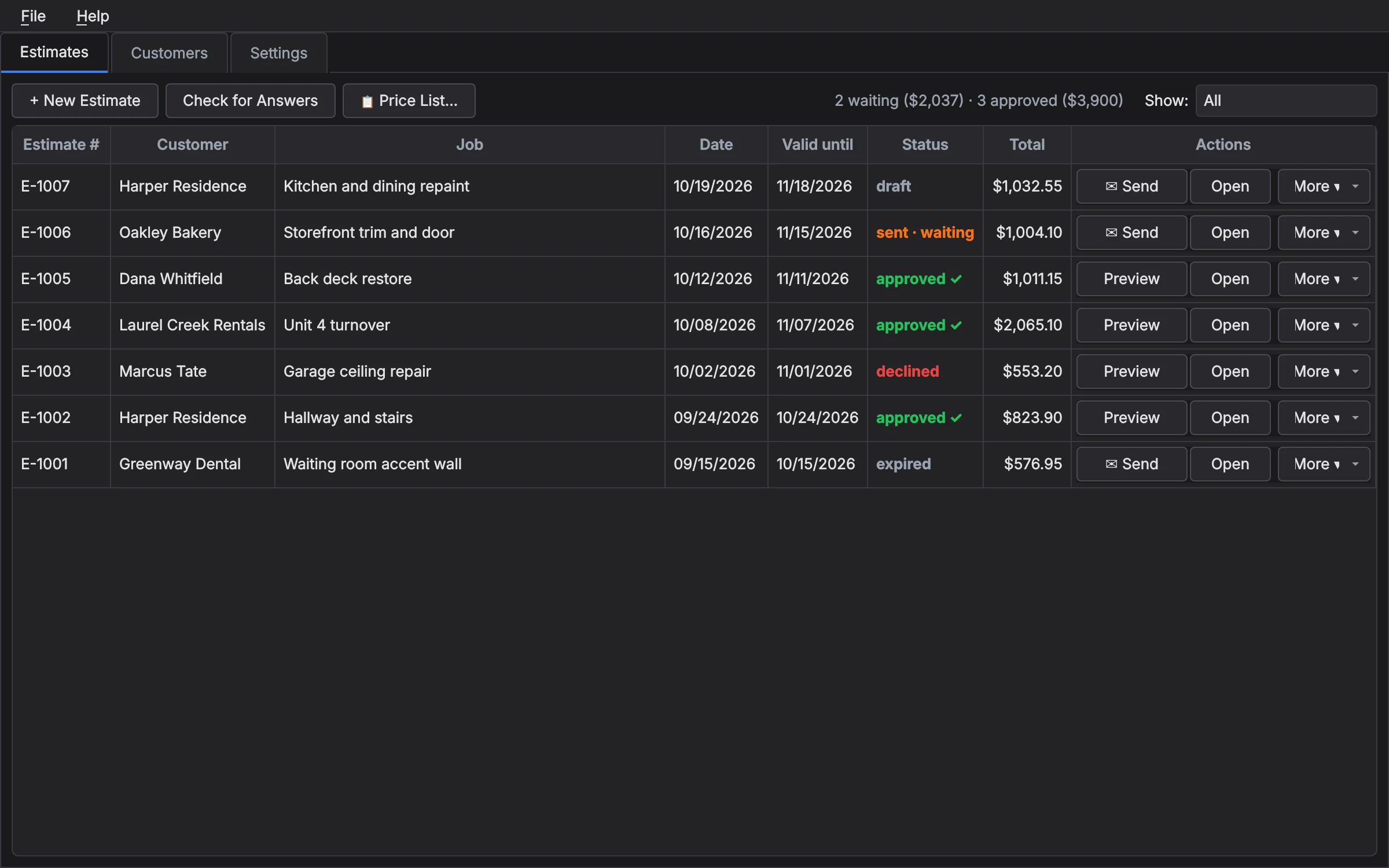

What Boxridge Quote does
Clients sign online
Send to Client emails a PDF and a private link. They approve and sign on any phone or computer, and you get an email right away.
Or sign in person
Hand over your laptop or tablet: they sign on your screen with a finger, pen or mouse, or type their name.
Your price list
Save the work and materials you price often, with units and tax, and add them to an estimate in a click.
Looks professional
Your logo, business details, terms and a valid-until date on a clean estimate you can print or save as PDF.
Deposits and tax
Ask for a deposit as a percentage or an amount, and choose which lines are taxable.
On your phone too
Add materials right in the store aisle, change lines or start a new estimate on your phone (Android or iPhone); it’s on your PC a minute later.
Ask for reviews
When the job’s done, send a thank-you with your Google review link in a couple of clicks.
Know where each one stands
Draft, sent, approved, declined or expired, at a glance.
Backups built in
A backup every time you close it, and restore in a couple of clicks.
Bigger jobs too
Split an estimate into sections with their own subtotals, a scope of work and assumptions, and show the client every line or just each section’s total.
Your kind of work
Trades, office and professional services, or photography and events: Quote uses your words on screen and on your estimates.
Grows into Ledger
Need invoices and bookkeeping later? Boxridge Ledger brings in your Quote estimates, customers and price list.
Details
- Works on
- Windows 10 / 11 (64-bit)
- Current version
- 1.2.0
- Download size
- 64.8 MB
- License
- One-time purchase, 3 PCs
- Updates
- Free within version 1.x
What’s new
Boxridge Quote 1.2.0: Detailed estimates with sections, units, scope of work and assumptions, a section-totals view for clients, your own full copy, page numbers, and a choice of your type of work so Quote uses your words. Signed by Steve Barker.
Boxridge Quote 1.1.1: a Boxridge Quote box while it starts. Signed by Steve Barker.
Boxridge Quote 1.1.0: estimates on your phone (add materials in the store, change a draft or start one; pair with Estimates tab - Phone...) and Ask for a Review with your Google review link. Signed by Steve Barker.
Boxridge Quote 1.0.0: estimates your clients approve and sign, online or in person. Signed by Steve Barker.
Boxridge Quote FAQ
How do clients sign?
Click Send to Client: they get an email with the estimate as a PDF and a private link. On any phone or computer they review it, sign with a finger or the mouse (or type their name), and tap Approve or Decline. You get an email right away, and the answer and signature come back into Boxridge Quote. They can also sign in person on your screen.
What is the difference between Quote and Ledger?
Boxridge Quote is estimates only. Boxridge Ledger includes the very same estimates plus invoices, payments, expenses, mileage and tax-time totals. If you move up to Ledger, File, Bring in Boxridge Quote Data copies your estimates, customers and price list over.
Is there a free trial?
Yes. Every feature works free for 30 days, with no account and no credit card. After that your estimates stay open to view, print and back up; writing or changing estimates needs a license key.
How does the license key work?
After you buy, your key is shown on screen, emailed to you and kept in your account. Paste it into Boxridge Quote (Help, Enter License Key). The first time, the app activates it online (one license covers 3 of your PCs, and you can move it from your account any time). After that it works offline and never expires.
Can I work on estimates from my phone?
Yes, with a license. Pair your phone once (Estimates tab, Phone…, scan the code) and your draft estimates are on it: add materials as you shop, change lines, or start a new estimate. Nothing to install from an app store, and it works on Android and iPhone. Estimates you have sent to a client stay on the PC.
Where are my estimates kept?
On your PC. An estimate you send for online signing is also kept on boxridgesoftware.com for your client to view and sign, for up to two years. Deleting it in Boxridge Quote takes the link down.
You might also like

Boxridge Ledger
Send estimates your clients sign on their phone, turn them into invoices, see what each job made, and get your numbers ready for tax time. Set up for trades, offices or photographers.

Boxridge ShiftLog
A phone app for logging hours, miles, jobs and expenses, synced to Boxridge Ledger on the office PC. Monthly plans for solo workers and crews.