
FinishBox
Fast photo editing for event and sports photographers.
FinishBox was built by a working event photographer who turns around thousands of photos per shoot. Open a folder of culled photos, let Auto do the routine work, fix the few that need a hand and export everything in one pass. No catalog to import into, no subscription, and every AI feature runs on your own computer, so no photo is ever uploaded.
Made for: Event, race and sports photographers who shoot big volumes and need fast turnaround.
Batch photo editing built for event and sports photographers →
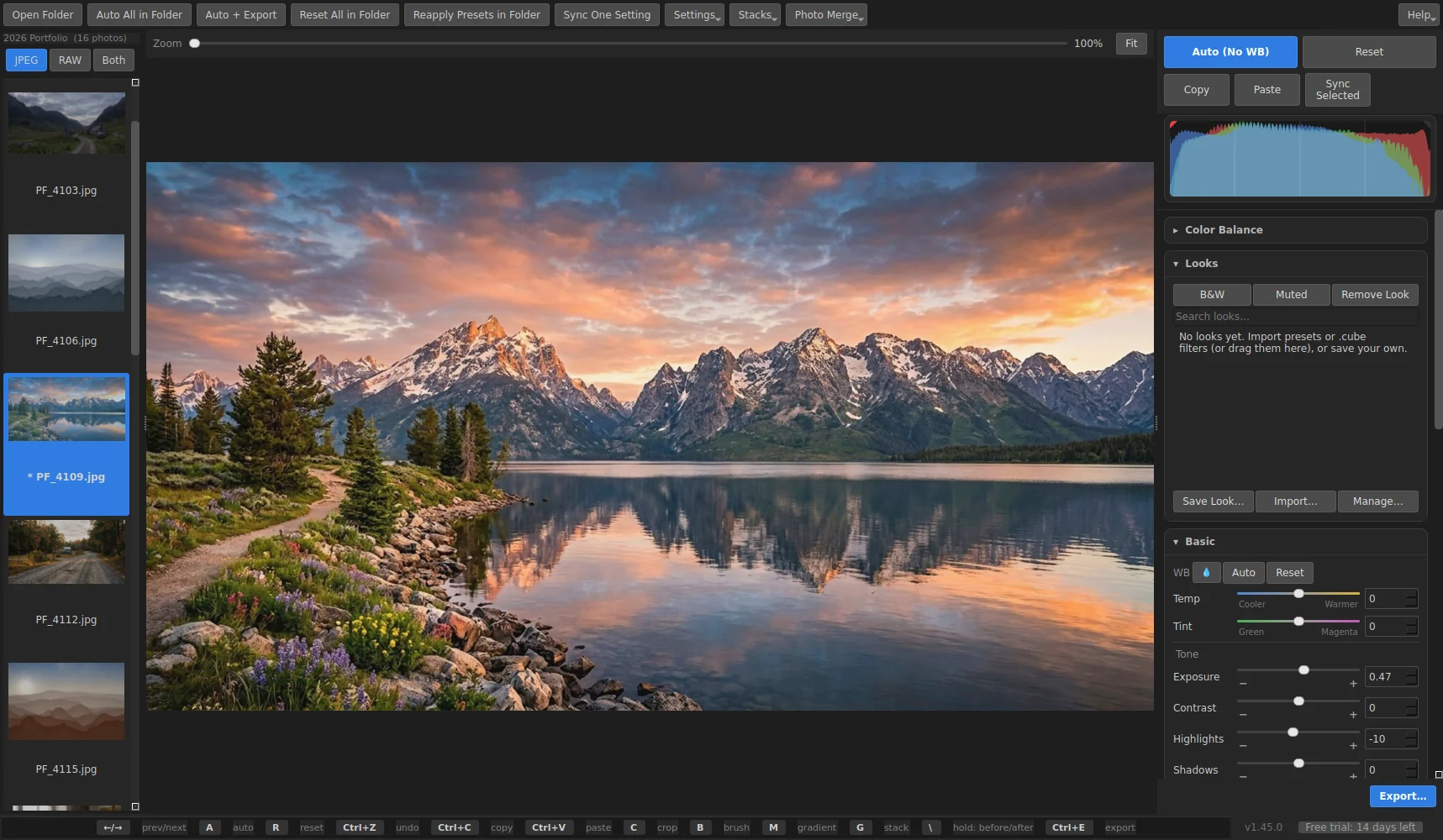


What FinishBox does
Auto that respects your photo
A light tune-up of exposure, white balance and tone on one photo or a whole folder, with your own limits and offsets so Auto matches your style.
Built for bulk
Auto All in Folder, copy and paste or sync settings to a selection, and several export sizes from a single pass. Designed around 1,000+ photo shoots.
RAW and JPEG
RAW files from nearly every camera open looking like the camera's own JPEG, with the extra highlight and shadow room RAW gives. Show JPEG, RAW or both.
AI masks and Light the Face
One click selects the subject, the sky or the background; Light the Face lifts every subject's face. All on your own PC, on its graphics card when it has one.
AI Remove
Paint over a person, a sign or a cone and FinishBox fills the spot in from the rest of the picture. Move any slider afterwards and the removal stays put.
AI Denoise and AI Enlarge
Clean up high-ISO night and gym shots while keeping the detail, and enlarge a crop to twice its size.
Lens corrections and Upright
Distortion, color fringes and vignetting fixed from the lens profile, found from the photo itself, plus one-click Upright for leaning buildings and horizons.
Card dumps as they happen
Copy a card into the open folder and its photos appear as they arrive, marked NEW for that card, so you can start editing before the copy is done.
Virtual copies, Before | After and History
Try a second version of a photo without a second file, compare before and after side by side, and step back through every change or a named snapshot.
Stacks, looks and Photo Merge
Bursts grouped automatically; your own looks plus imported presets and .cube filters; HDR and panoramas.
The tools you expect
Tone curve, color mixer, color grading, white balance presets, clipping warnings, crop and auto straighten, brush and gradients with combined masks, spot removal and clone, grain.
Export the way you deliver
Several sizes in one pass, sRGB, opRGB or P3 with the right profile, output sharpening for screen or print, and a logo or text watermark built from the caption, date or file name.
Your metadata and originals stay safe
Captions, keywords and bib numbers come through export, and your originals are never changed unless you choose to save over them (with a backup).
Details
- Works on
- Windows 10 / 11 (64-bit). JPEG and camera RAW.
- Current version
- 1.47.5
- Download size
- 798.1 MB
- License
- One-time purchase, 3 PCs
- Updates
- Free within version 1.x
What’s new
FinishBox 1.47.5: Fixes the FinishBox window growing wider than the screen while Auto All, an export or another long job is running (on screens with Windows scaling turned up). Signed by Steve Barker.
FinishBox 1.47.1: Delete without the question (a new switch in Settings) - the photo stays with Undelete on it, and Undelete now also brings back photos deleted before the folder was closed. Faster export and faster editing of big photos, with exactly the same results. Fixes: a damaged or half-copied photo now says so instead of showing the last photo, no more pauses when opening photos that use AI masks, less memory used on computers without a graphics card, and a hint when the filmstrip is set to RAW on a folder of JPEGs (or the other way round). Signed by Steve Barker.
FinishBox 1.47.0: Match a photo to a saved reference, Pick Subject to select the main subject with a click, export again over earlier exports, a Stop button on every long job, and many fixes. Signed by Steve Barker.
FinishBox 1.46.5: a FinishBox box while it starts. Signed by Steve Barker.
FinishBox 1.46.4: AI Remove, AI Enlarge, lens corrections and Upright, card dumps that appear as they copy, virtual copies, Before and After side by side, History and snapshots, export color spaces, sharpening and text watermarks, update notices, and the new Boxridge icon. Signed by Steve Barker.
FinishBox FAQ
Is there a free trial?
Yes. Every feature works free for 14 days, with no account and no credit card. After that you can still open, browse and edit photos, and your edits are kept; Export, Photo Merge and Open in Another Editor need a license key.
How does the license key work?
After you buy, your key is shown on screen, emailed to you and kept in your account. In FinishBox open Help, License, paste the key and click Activate. The first time, the app activates it online (one license covers 3 of your PCs, and you can move it from your account any time). After that it works offline.
Does it support RAW files?
Yes, RAW files from nearly every camera, as well as JPEG. You can show JPEG only, RAW only or both in the filmstrip.
Do the AI features need the internet?
No. Subject, sky and background masks, Light the Face, AI Remove, AI Denoise and AI Enlarge run on your own computer, on its graphics card when it has one. No photo is ever uploaded.
Will it keep my metadata?
Yes. EXIF, IPTC and XMP data, including captions, keywords and bib numbers, come through export.
Can I use my presets and filters?
Yes. Save your own looks, or bring in .xmp, .lrtemplate and .dng presets and .cube filters you've bought: drag the downloaded .zip onto FinishBox.
Is there a portable version?
Yes. Besides the installer there is a portable zip you can run from a folder or a USB drive, with its settings kept beside it.
You might also like

Boxridge Raw
Bulk RAW to JPEG converter that makes files look like a good camera JPEG, with every bit of metadata, captions and bib numbers kept.

Boxridge Cull
Keyboard-driven photo culling with blur detection and a duplicate finder. Import straight from the card and export only your picks.