
Boxridge Raw
Thousands of RAWs to great-looking JPEGs, in one go.
Boxridge Raw is a bulk RAW to JPEG converter built for event and sports shoots. Drop in a card or a folder of thousands of RAWs and it hands back JPEGs that already look like a well-exposed camera JPEG, so your editing step only needs a small tweak. It uses every CPU core, keeps your PC usable while it works, copies all your metadata, captions and bib numbers across, and can pick up an interrupted job right where it stopped.
Made for: Event and sports photographers, and anyone who shoots RAW and needs a lot of JPEGs fast.
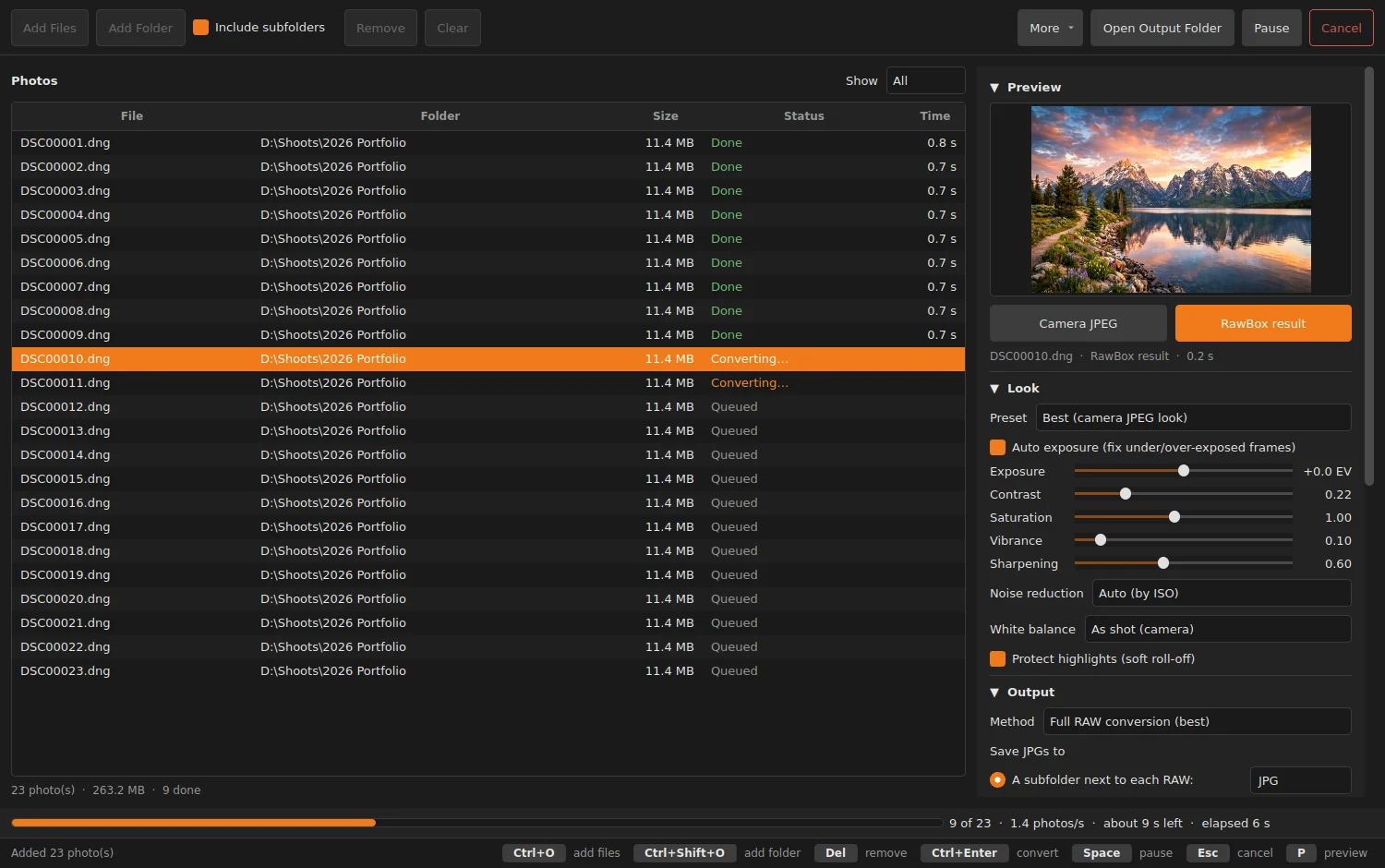

What Boxridge Raw does
Camera-JPEG look
Tuned against the cameras’ own JPEGs: auto exposure, highlight protection and natural color.
Built for big jobs
Uses every core but one, keeps memory flat and handles 20,000+ file lists without slowing down.
Every major RAW format
Canon CR3/CR2, Nikon NEF, Sony ARW, Fuji RAF, DNG, Olympus ORF, Panasonic RW2 and more.
Metadata kept
EXIF, IPTC captions, keywords, bib numbers and XMP sidecar ratings all copied to the JPG.
Preview before you commit
Flip between the camera’s JPEG and the Boxridge Raw result, then tweak with simple sliders.
Safe and resumable
Pause, resume or cancel any time. No half-written files, and re-running a job skips what’s done.
Noise reduction by ISO
Cleans up high-ISO color noise automatically, stronger only where it’s needed.
Pairs with FinishBox
The Flat preset gives FinishBox a clean starting point for its Auto All.
Details
- Works on
- Windows 10 / 11 (64-bit)
- Current version
- 1.1.5
- Download size
- 119.7 MB
- License
- One-time purchase, 3 PCs
- Updates
- Free within version 1.x
What’s new
Boxridge Raw 1.1.5: Boxridge Raw now updates itself. Check for Updates is in the More menu, and once a day it quietly looks for a new version and offers to install it. Signed by Steve Barker.
Boxridge Raw 1.1.4: a Boxridge Raw box while it starts, and the Boxridge box icon on the desktop, Start menu and taskbar, same as the website. Signed by Steve Barker.
Boxridge Raw 1.1.3: the app is called Boxridge Raw everywhere (window, menus, Start menu, desktop icon), same as the website. Signed by Steve Barker.
RawBox 1.1.2: one-time online activation (one license covers 3 PCs); signed by Steve Barker.
RawBox 1.1.1: fixes a start-up console flash in the trial check. Signed by Steve Barker.
Boxridge Raw FAQ
Which cameras are supported?
Canon CR3/CR2/CRW, Nikon NEF/NRW, Sony ARW/SRF/SR2, Fujifilm RAF, Adobe DNG, Olympus/OM ORF, Panasonic RW2, Pentax PEF, Leica, Hasselblad, Phase One and more.
Will my captions and bib numbers carry over?
Yes. All EXIF, IPTC and XMP is copied to the JPG, and XMP sidecar ratings, labels and keywords are merged in.
Does it change my RAW files?
No. RAWs are only read. JPGs go to a JPG subfolder by default, or anywhere you choose.
What if my PC shuts down mid-job?
Each JPG is written under a temporary name and renamed when complete, so nothing is left half-written. Run the job again and it skips everything already done.
Can it make smaller JPGs for the web?
Yes. Pick full size or a long edge from 6000 px down to 1080 px. Smaller sizes are much faster.
Is there a free trial?
Yes. Every feature works free for 14 days, with no account and no credit card. After that you can still add and preview photos; converting needs a license key.
How does the license key work?
After you buy, your key is shown on screen, emailed to you and kept in your account. Paste it into RawBox (More, Enter License Key). The first time, the app activates it online (one license covers 3 of your PCs, and you can move it from your account any time). After that it works offline and never expires.
You might also like

FinishBox
Edit a whole shoot in one pass: a light-touch Auto for every photo, AI masks, AI Remove and denoise that run on your own PC, RAW and JPEG, and fast bulk export.

Boxridge Cull
Keyboard-driven photo culling with blur detection and a duplicate finder. Import straight from the card and export only your picks.