
Boxridge Find
Find any file, photo or document in milliseconds.
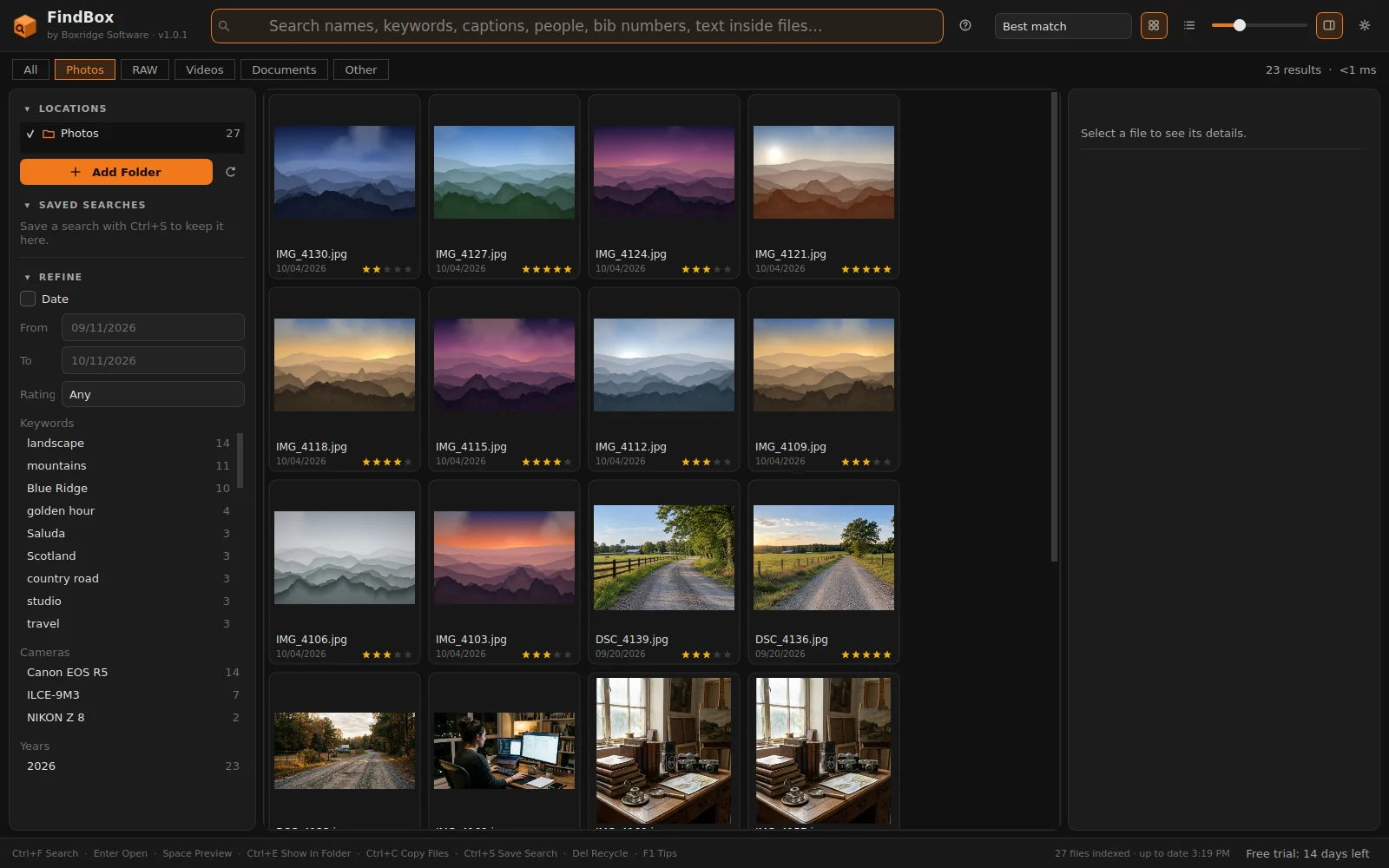
Boxridge Find keeps its own index of the folders and drives you choose, so every search answers as you type, even across hundreds of thousands of files and unplugged external drives. It reads the metadata photographers actually use (keywords, captions, people and face names, bib numbers, ratings, labels, camera, lens, GPS and dates from EXIF, IPTC, XMP and sidecars) and the text inside Word, Excel, PowerPoint, PDF and text files. Narrow the results with a click, preview them, drag them into any app, or copy a whole set to a folder for a client.
Made for: Photographers with years of shoots on several drives, and anyone who has given up on Windows Search.


What Boxridge Find does
Instant search as you type
Answers in milliseconds across folders, whole drives and external drives that are not even plugged in.
Searches photo metadata
Keywords, captions, people and face names, bib numbers, ratings, color labels, camera, lens, GPS and dates. EXIF, IPTC, XMP and .xmp sidecars from JPEG, RAW, TIFF, PNG and HEIC.
Searches inside documents
Finds the words inside Word, Excel, PowerPoint, PDF and text files.
Narrow down with a click
Photo, RAW, video and document filters, plus keyword, people, camera and year lists, a date range and star ratings.
Act on the results
Thumbnails and Quick Look preview, drag files into any app, copy or move a set to a folder without overwriting, export to CSV, and saved searches.
Always up to date
Watches your folders and re-reads only the files that changed. Your files are never changed or uploaded.
Details
- Works on
- Windows 10 / 11 (64-bit)
- Current version
- 1.0.4
- Download size
- 41.2 MB
- License
- One-time purchase, 3 PCs
- Updates
- Free within version 1.x
What’s new
Boxridge Find 1.0.4: Boxridge Find now updates itself. Check for Updates is in the gear menu, and once a day it quietly looks for a new version and offers to install it. Signed by Steve Barker.
Boxridge Find 1.0.3: a Boxridge Find box while it starts. Signed by Steve Barker.
Boxridge Find 1.0.2: the app is called Boxridge Find everywhere (window, menus, right-click menu, Start menu, desktop icon), same as the website. Signed by Steve Barker.
FindBox 1.0.1: one-time online activation (one license covers 3 PCs); signed by Steve Barker.
FindBox 1.0.0: first release. Fast search for files, photos and documents, 14-day free trial. Signed by Steve Barker.
Boxridge Find FAQ
Does it change or upload my files?
No. Boxridge Find only reads your files to build an index that stays on your PC. It never changes them, except when you choose Move to Folder or Send to Recycle Bin.
Can it search drives that are unplugged?
Yes. Files on an external drive stay searchable when it is unplugged and are marked offline until you plug it back in.
Which photo metadata does it read?
EXIF, IPTC and XMP, including Lightroom and Photo Mechanic keywords and captions, face-tagging names, ratings, color labels, bib numbers in captions or comments, and .xmp sidecar files.
How big is the index?
About 2.5 KB per file, so roughly 250 MB per 100,000 files, plus a thumbnail cache capped at 1 GB.
Is there a free trial?
Yes. Every feature works free for 14 days, with no account and no credit card. After that, searching, browsing, previewing and opening files stay free; Copy to Folder, Move to Folder, Export to CSV and Saved Searches need a license key.
How does the license key work?
After you buy, your key is shown on screen, emailed to you and kept in your account. In FindBox open Menu, License, paste the key and click Activate. The first time, the app activates it online (one license covers 3 of your PCs, and you can move it from your account any time). After that it works offline and never expires.
You might also like

Boxridge Snap
The Snipping Tool replacement: instant region capture, snap to any window, whole web page screenshots, blur and annotate, and file names that number themselves.

VaultBox
A password manager that also keeps the serial numbers, receipts, photos and warranties of everything you own, plus your software license keys. Encrypted on your PC, never in anyone's cloud.

CleanBox
Clears junk files, repairs damaged system files, checks your disk, runs a malware scan and optimizes your drives in the right order with one click, with live progress, a report and a schedule. Nothing extra installed, no scare tactics.