
Boxridge Listen
Open a PDF, document or web page and it reads it aloud. No highlighting, no tapping: just listen.
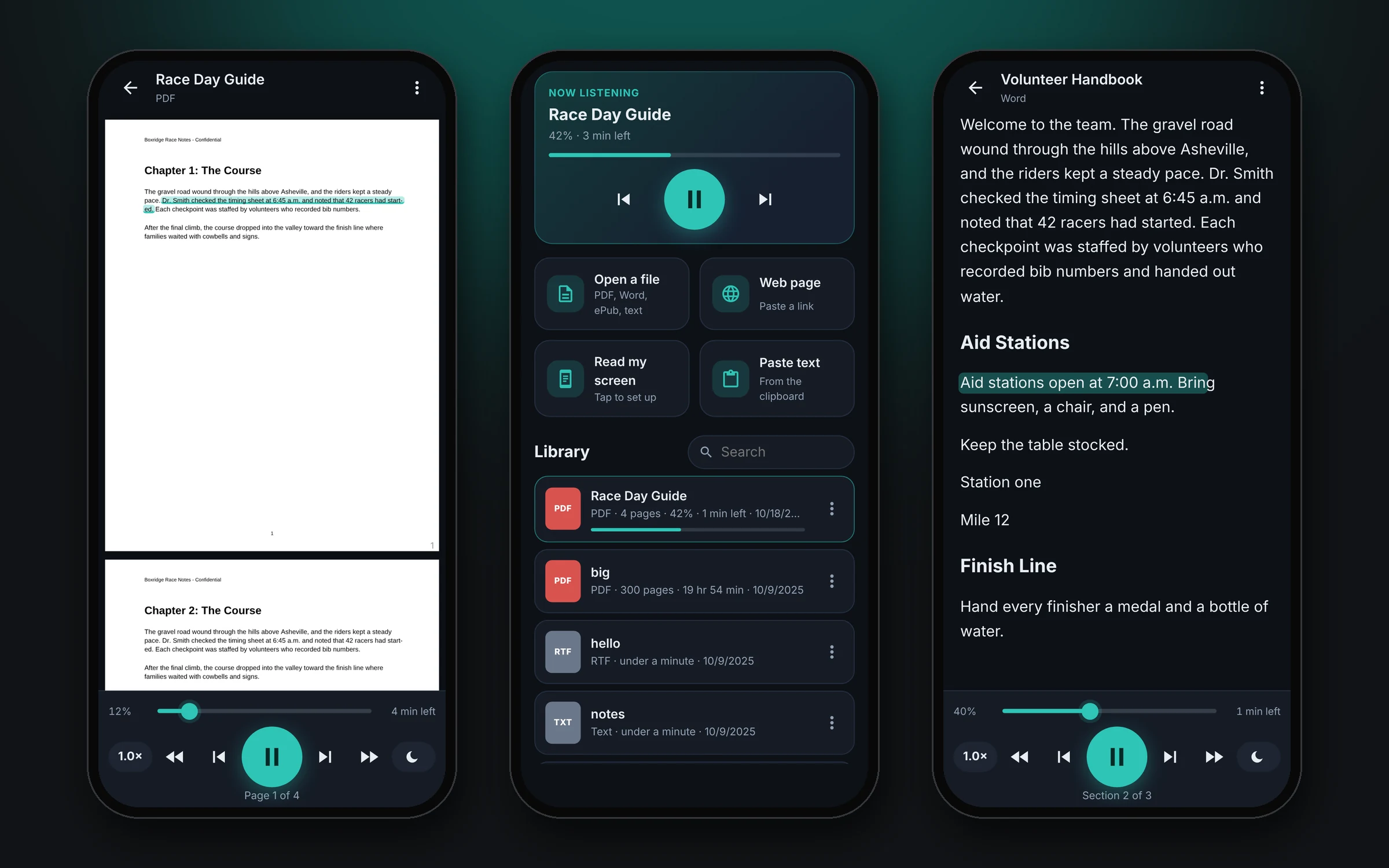
Boxridge Listen turns anything you would normally have to read into something you can listen to. Open a PDF, a Word document, an ePub book or a web page and it starts reading right away, from the top or from exactly where you left off. Put the phone in your pocket, lock the screen and keep listening: on a long drive, a walk, or while your hands are busy. Boxridge Listen is coming to Google Play as a one-time purchase. Join the list on this page to hear the day it is out.
Made for: Anyone who would rather listen than read: long drives, walks, chores, or resting your eyes.

What Boxridge Listen does
Reads almost anything
PDFs (even scanned ones), Word, ePub books, text, Markdown, RTF and web pages. Share an article from Chrome and it reads just the story, without the menus and ads.
Reads your screen
One tap reads whatever app you have open, such as email, chats or a website, and it keeps scrolling to the end.
Controls on your lock screen
Play, pause and skip from the lock screen, a home-screen widget, Bluetooth headphones or your car, just like a music app.
Remembers your place
Every document picks up where you stopped, and shows how much is left.
Follow along
The sentence being read is highlighted on the page. Tap any sentence to jump there.
Made for the road
Adjustable speed, a sleep timer, and it pauses for calls and navigation prompts.
Works offline
Uses the voices already on your phone, so it keeps reading without a signal.
Private
Your documents stay on your phone. Nothing is uploaded.
Details
- Works on
- Android phones (Android 8.0 or later)
- Current version
- 1.1
- License
- One-time purchase, 3 PCs
- Updates
- Free within version 1.x
Boxridge Listen FAQ
When is it coming?
Boxridge Listen is finished and in testing. It will be on Google Play soon. Join the list on this page and you will get one email the day it is out.
Is there an iPhone version?
Not yet. Boxridge Listen is for Android phones.
Which voices does it use?
The text-to-speech voices installed on your phone. On Pixel phones Google's voices sound good, and the ones marked "needs internet" sound best. You can hear each voice and change the speed in Settings.
Can it read with the screen locked?
Yes. Documents and web pages keep reading with the phone locked, and the controls are on the lock screen. Reading another app's screen needs that app open, so it stops when the phone locks.
What does "Read my screen" need?
A one-time Android accessibility permission, which the app walks you through. It only uses it to read the screen out loud when you ask it to.
You might also like

Boxridge Snap
The Snipping Tool replacement: instant region capture, snap to any window, whole web page screenshots, blur and annotate, and file names that number themselves.

Boxridge Find
Search every file, photo and document by name, keywords, captions, people, bib numbers, camera details or the text inside, far faster than Windows Search.

VaultBox
A password manager that also keeps the serial numbers, receipts, photos and warranties of everything you own, plus your software license keys. Encrypted on your PC, never in anyone's cloud.